Showing posts with label Tech tips. Show all posts

Tuesday, June 30, 2015

ALL PRE/POST - CL, QL, TF, M7CL, LS9

How do I change the MIX1 (AUX1) to POST all input channels at once ?

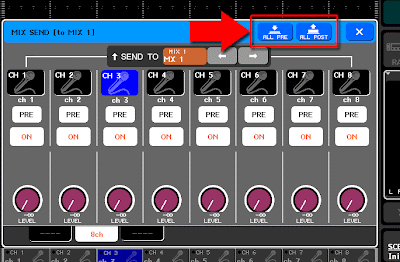
CL, QL, M7CL, LS9:
Open the MIX SEND popup by pressing the TO MIX1 SEND LEVEL knob in the selected channel or overview screen. In the popup screen, you have "ALL PRE" and "ALL POST" button on the upper right corner.

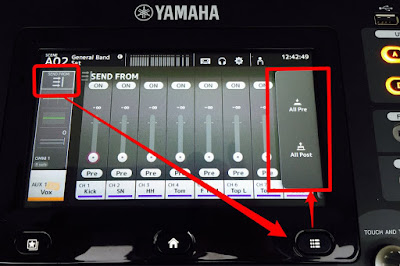
TF series:
Select Output fader bank and select AUX1. Touch on the top of the channel strip to open SEND FROM screen. Press the [Menu] key below the screen and select All Pre or All Post command from the menu.
Sunday, April 19, 2015

Fader calibration

Faders on my console have chattering (vibrate when they are moved with a scene recall). Do they need to be serviced?

Usually, friction of a slider will be changed after running the console for several months, which depends on usage, environment, frequency of scene recalling, etc. Or the faders might have much dust inside. These may cause overshooting of fader position control. Please try Fader Calibration function of the console before contacting Yamaha service.

Please don't use any contact cleaner. It will remove special contact grease in a fader and make the situation worse.


(CL series and M7CL) While holding down the SCENE MEMORY [STORE] key of the panel, turn on the power. Press the FADER CALIBRATION button and follow the instruction in the screen.

(QL series) While holding down [SEL] key of master B, turn on the power. Press the FADER CALIBRATION button and follow the instruction in the screen.

(TF series) While holding down [Home] key under the LCD touch panel, turn on the power. Press the Fader Calibration button and follow the instruction in the screen.

(PM5D) While holding down the [ENTER] key of the panel, turn on the power of the PW800W power supply. Select "CALIBRATE FADER POSITION" and follow the instruction in the screen.

(LS9) While holding down the [SCENE MEMORY] key of the DISPLAY ACCESS section, turn on the power. Move the cursor to the FADER CALIBRATION button and press the [ENTER] key.

Updated on April 20, 2015 with QL and TF series.

Monday, July 29, 2013

"Audio Quality in Networked Systems" series


Hi everyone,

Have you read the series of articles? I believe this is the first time to introduce the material to you here.
- Audio Quality in Networked Systems -
This biweekly series of white paper presents a summary of the most important quality issues in networked audio systems to support system designers and sound engineers in maximizing their system’s Performance and Response, achieving the maximum Audio Quality and Sound Quality.
And we have uploaded the sixth chapter of the "Audio Quality in Networked Systems" series yesterday.
I hope you will find something new with it.

Shaun

Tuesday, December 4, 2012

CL seires -- 8 MUTE groups with Dimmer level


MUTE group in CL series comes with new Dimmer level control.
When the Dimmer level is set to infinity, it functions as a traditional Mute group.
When you set the Dimmer level to -10, audio channels in the MUTE group are attenuated by 10 dB.


Small but handy update.
Shaun


Wednesday, June 27, 2012

01V96i Quick Start Guide


We've just released a brand new Quick Start Guide for our 01V96i Digital Mixing Console to help make your transition to the 01V96i even easier.  This guide isn't designed to replace the manual but it will be quite helpful for those of you familiar with mixing console theory looking to jump on an 01V96i for the first time.

The beginning of the guide runs through basic console operation and signal flow which many of you may already be familiar with if you've used an 01V96 in the past.  In addition to this however; the guide also offers tips on recording via USB to Cubase AI as well as setting up and syncing with the 01V96i Editor.  Towards the end of the guide you'll find some great shortcuts and tips perfect for maximizing productivity with the 01V96i.

If you have questions about some part/s of the guide you can always refer back to the owner's manual for further clarification or call into our Technical Support Department for help over the phone. 

Link to: 01V96i Quick Start Guide

All the best,

Nick

Tuesday, April 3, 2012

Assignable Encoder

CL series has an Assignable Encoder on each channel. Gain and Pan are default functions for it. And you may assign one parameter to the third function.

As a default, "Selected Send" is assigned. Your last selected Sends On Fader destination will be automatically assigned to the knob.

Do you like it?
Shaun

Monday, March 26, 2012

Touch and Turn (User Defined Knob)

We put four knobs next to the LCD. You may assign different functions to them --

Lamp dimmer, EQ/Comp parameter, Send level, and most of other functions can be controlled by a knob.

One of a new function for it is "Touch and Turn".
You may find a pink circle in LCD screen. When you touch a knob icon in the screen, the pink circle moves to it and a User Defined Knob assigned to "Touch and Turn" can control its value.
This will allow you to maximize convenience of touch screen operation.
User Defined Knob D is assigned to the function as a default. Please try.

Shaun

Thursday, March 22, 2012

M7CL / LS9 StageMix version 3

StageMix will be updated to Version 3 in April.
Much more functions will be available from your iPad. Here is a list of new features.
  • DCA Faders (M7CL only)
  • Mute Group Masters
  • Channel Naming
  • Channel Pan
  • Send Levels in Meter Bridge
  • Tap Tempo
  • Edit Mixer Setting (e.g. IP and MAC Addresses)
  • Bank Navigation in Long Faders mode
  • Selectable Input and Output Meter Positions
  • EQ Type I / II button in EQ screen
  • HPF ON button always available in EQ screen

Wednesday, March 21, 2012

Premium Rack with Portico

We introduced Premium Rack with the CL series consoles.
It is another 8U processing rack for premium VCM effects from RND and Yamaha. You have, of course, a regular 8U effect rack for traditional VCM and SPX programs besides it.


The premium RND programs include Portico 5033/5043 which have been available as VST plug-ins for DAW software. The CL series come with these programs as a default and you may use up to eight instance of them. The Portico 5033 has a bypass switch which bypasses EQ processing BUT its transformer emulation. Many engineers already mentioned that it added essence of high quality analog circuit to the system.


PDF brochure is available for more details.

Thursday, June 30, 2011

Audioversity 2011 -- Las Vegas

Audioversity 2011 is on the way! If you missed the event last year in Nashville, you definitely don't want to miss this one. We'll have plenty of Yamaha and NEXO staff members on hand to train you on almost every piece of equipment we offer. In addition, we're giving away a LS9-16 digital mixing console on each day of the event! For more details, please visit www.audioversityexpo.com.

Audioversity 2010 Photos

Audioversity 2010 Class Schedule

Thursday, June 9, 2011

Rolling Showroom Trainings in the Midwest

The Yamaha Rolling Showroom will kick off its summer tour season with two events in the Midwest featuring YCATS (Yamaha Commercial Audio Training Seminars) training sessions: June 21 in Columbus, OH and June 23 in Livonia, MI.

Live! Technologies in Columbus, OH will host the June 21 demo event, followed by a BBQ courtesy of Yamaha and Live!. Sessions will include training on the Yamaha M7CL48-ES, DM1000, digital networking, Yamaha speakers, and amplifiers.

The June 23 session will take place at Schoolcraft College in Livonia, MI and will include training on the Yamaha M7CL48-ES, DM1000, digital networks, NEXO speakers, and amplifiers.

Each training session for both locations will last one hour, and attendees can sign-up for one or more events. They both make use of the Yamaha Rolling Showroom, a demo room on wheels that is fully equipped with Yamaha digital mixers, processors, networking products, amplifiers, and speakers.

Yamaha regional staff will also be on hand to answer product-specific questions. To sign up and receive further details, session times, and event locations, visit

http://www.yamahacommercialaudiosystems.com/training_class_desc.php?courseID=16.

Monday, May 23, 2011

StageMix updated

LS9 StageMix V1.1 and M7CL StageMix V1.6 are released yesterday.

Please update yours for better stability, and STEREO and MONO master faders are now available for M7CL.

Monday, April 4, 2011

Console File Converter released

We have just released the utility software. Now you can move your console file between PM5D, M7CL, and LS9.
Please note that some parameters will be changed with a optimizing rule for the most compatibility, or not converted. Please check the owner's manual for details.

Tuesday, November 16, 2010

V3.5 for M7CL will be available in this winter

It's just announced today.
Beta version will be demonstrated at InterBEE in Makuhari, Japan. I'll be there tomorrow. If you are coming to the show, please come to the Yamaha booth and find me!

Alternate functions will be very handy. Please press and hold UDK #8 and operate the Selected Channel section to find new parameters.
Many more features will be added to make your experience with M7CL better. Please check them at the Yamaha web site.

Monday, November 8, 2010

StageMix now available

It's already been talked in twitter and other places.
The M7CL StageMix is available to download to your iPad.
Have you already tried?
Please let us know what you think.

Tuesday, October 12, 2010

M7CL V3 Quick Start Guide Part3

M7CL Quick Start Guide for memory management and M7CLV3 Editor is now available. The last part of our M7CL School is described in this document. Please take a look!

Table of Contents
Scene Management and other memorised features ............3
How to store a scene ............3
How to recall a scene ............4
Managing the Scene List ............5
Editing Scenes; Single and Global Paste ............5
Limiting the Effect of Scene Recall ............6
  Recall Safe ......6
  Focus ......8
  What is in a Scene ......9

Saving and Loading Data ............9
Other Memorised Data ...........11
Management of M7CL console fi les. ...........11
Studio Manager and the M7CLV3 Editor ...........12
  Background ......12
  What is Studio Manager for? Where can I get Studio Manager? ......13
  Which Version of Software should I use? How can I deal with older Versions? ......14
  StageMix for Apple iPad by Yamaha ......15
  Opening Studio Manager and the Editor for the fi rst time ......16
  Using Editor Windows ......16
  Changing Parameters ......17
  The SEL Channel Windows ......18
  Keyboard Short-cuts ......19

Scene Management using Studio Manager and the M7CLV3 Editor ...........20
  Editing Console Files on the M7CL Editor ......20
  Using the Scene Window ......21
  Library window dragging ......22
  More library window dragging ......23
  Using two M7CLV3 Editors to merge scenes from different sessions ......23

Sunday, September 12, 2010

Network ASIO Streamer for M7CL-48ES


For M7CL-48ES uses, we will release new firmware which will support direct multi-track recording capability from your EtherSound satge box to DAW software on PC without any extra hardware required.
The function for two EtherSound devices has been already released by AuviTran early this year. And M7CL-48ES will also support it this Fall.

iPad app "StageMix" for M7CL V3 announced


Hi everyone,

The news is from PLASA in UK. We will release the remote control software for M7CL V3 users soon.
If you don't have V3 yet, please update your console to be ready for the StageMix!

Monday, August 2, 2010

Mac version uploaded

Hello guys who was waiting for the software!
It's finally available for M7CL and LS9. Please remember to download the Studio Manager host software, the driver and the firmware (only for LS9 users) together.
Please check the compatibility information on the download page before you install them.