Showing posts with label CL Series. Show all posts

Tuesday, June 30, 2015

ALL PRE/POST - CL, QL, TF, M7CL, LS9

How do I change the MIX1 (AUX1) to POST all input channels at once ?

CL, QL, M7CL, LS9:
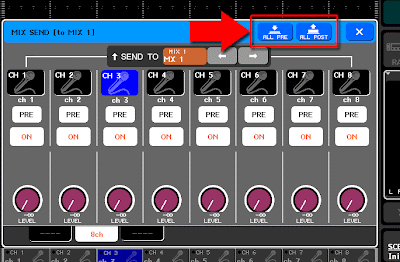
Open the MIX SEND popup by pressing the TO MIX1 SEND LEVEL knob in the selected channel or overview screen. In the popup screen, you have "ALL PRE" and "ALL POST" button on the upper right corner.

TF series:
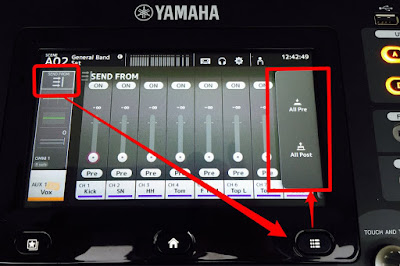
Select Output fader bank and select AUX1. Touch on the top of the channel strip to open SEND FROM screen. Press the [Menu] key below the screen and select All Pre or All Post command from the menu.
Sunday, April 26, 2015

V3.01 for CL and QL series


V3.01 firmware for CL series and QL series were released last week.
They have some of minor but important fixes. Please find them on their download page.

CL firmware download page
QL firmware download page

Shaun

Sunday, April 19, 2015

Fader calibration

Faders on my console have chattering (vibrate when they are moved with a scene recall). Do they need to be serviced?

Usually, friction of a slider will be changed after running the console for several months, which depends on usage, environment, frequency of scene recalling, etc. Or the faders might have much dust inside. These may cause overshooting of fader position control. Please try Fader Calibration function of the console before contacting Yamaha service.

Please don't use any contact cleaner. It will remove special contact grease in a fader and make the situation worse.


(CL series and M7CL) While holding down the SCENE MEMORY [STORE] key of the panel, turn on the power. Press the FADER CALIBRATION button and follow the instruction in the screen.

(QL series) While holding down [SEL] key of master B, turn on the power. Press the FADER CALIBRATION button and follow the instruction in the screen.

(TF series) While holding down [Home] key under the LCD touch panel, turn on the power. Press the Fader Calibration button and follow the instruction in the screen.

(PM5D) While holding down the [ENTER] key of the panel, turn on the power of the PW800W power supply. Select "CALIBRATE FADER POSITION" and follow the instruction in the screen.

(LS9) While holding down the [SCENE MEMORY] key of the DISPLAY ACCESS section, turn on the power. Move the cursor to the FADER CALIBRATION button and press the [ENTER] key.

Updated on April 20, 2015 with QL and TF series.

Tuesday, April 7, 2015

V3 firmware for CL/QL series released


The new firmware is released with new StageMix and R Remote software.
This is a big step for the mixers. Now, you can use Dugan mixer on your CL. PEQ in output channel is expanded to 8-band on these mixers. RTA is also available in their PEQ and GEQ screen.
And what I really like is RTA on StageMix. It uses iPad microphone and is independent from the RTA on a console. This is very useful when you are checking speakers on stage.

List of features can be found here.
Please visit Download page for CL or QL.

Shaun

Wednesday, March 12, 2014

CL series V2.0 software

It is scheduled to be available in May. Here is a list of features:

DCA Roll-Out
Output DCA
Mix Minus
Read Only Scene Memory
Daisy Chain Insert
GR Meter Option on Channel Name Display
AG to DG Link Option for Gain Compensation

For more details, please visit the web site or leave a comment here.

Saturday, January 25, 2014

CL series V1.7 and Dante Contorller v3.5

CL series V1.7 firmware was released last month and Dante Controller V3.5 was release this week.
This combination gives you more flexibility of system management.

Filter for file loading is one of big improvements of the firmware. And network status monitoring is now available in the Dante Controller. 

Please check all of new features and improvements of the firmware here.
And Dante Controller is available at the Audinate web site.

Wednesday, August 7, 2013

CL series v1.61 is released

The fixed firmware is now available.
The HA issue is fixed and some of other issues too. Please check new features and improvements from v1.51 here.

Shaun

Monday, July 29, 2013

"Audio Quality in Networked Systems" series


Hi everyone,

Have you read the series of articles? I believe this is the first time to introduce the material to you here.
- Audio Quality in Networked Systems -
This biweekly series of white paper presents a summary of the most important quality issues in networked audio systems to support system designers and sound engineers in maximizing their system’s Performance and Response, achieving the maximum Audio Quality and Sound Quality.
And we have uploaded the sixth chapter of the "Audio Quality in Networked Systems" series yesterday.
I hope you will find something new with it.

Shaun

Wednesday, July 17, 2013

CL V1.6 uses, please go back to v1.51

We posted the following announcement to the CL firmware download page.

With V1.60 firmware, we have found that CL consoles may partially lose HA gain control of R series units after being powered on for a long period of time. We are preparing new firmware to fix this. Please use V1.5 firmware until the fixed firmware is released. If your current firmware version is V1.60, make sure to change it to the following:
CL: MAIN V1.51, SUB V1.50, Rio3224/1608-D V1.50, Ri8/Ro8-D V1.51
We sincerely apologize for the inconvenience.

Thursday, June 27, 2013

CL series v1.6 released


It's a busy week!
V1.6 software for CL 1/3/5 and Rio3224-D/168-D/Ri8-D/Ro8-D is released.
Now, Shure ULX-D and our new amplifiers appear in the I/O DEVICE screen to patch.
Please refer to the download page for details.
 

StageMix v4 released


The V4 is now available at App Store.
New features for LS9 and M7CL are:
  • Dynamics Processor Editing
  • Output Port Delay Editing
  • Output Port Phase
  • Output Port Levels (Attenuation)
  • PEQ Copy/Paste
  • Phantom Power Switching
  • Mix Send Pre/Post Switching
  • Retina Display Support
CL series got them all and "HPF Slope Parameter (CL V1.5 only)".

Shaun

Monday, March 11, 2013

CL series V1.5 software available

Software for CL series is updated to version 1.5.
It provides new features, improvements, and fixes.
Here are some new features:
  • Supports the Scene Preview function.
  • Supports the Help function.
  • Ri8-D, Ro8-D, NXAMP with NXDT104, etc. were added as Dante devices which can be detected / patched in CL series.
  • Added a CUE LEVEL knob to the CUE popup window, allowing adjustment of the Cue level. This can be assigned to a Custom Fader.
  • Added a HPF type select button to the HPF/EQ popup window (1ch), and the magnitude of attenuation has an option of -12dB/oct or -6dB/oct.
It is available here.

Shaun

Tuesday, January 8, 2013

Ro8-D Output Rack & Ri8-D Input Rack


We're proud to announce our latest addition to the CL/Rio lineage; the Ro8-D Output Rack and Ri8-D Input Rack.  The Ri8-D sports 8 mic/line inputs with the same natural sonic quality and musical characteristics that are present in the rest of the Rio line, the Ro8-D provides 8 line level outputs perfect for amp rooms and monitor console racks. This new offering of 1U rack space units maintains the same Dante Network Protocol present in our CL Series of mixing consoles and our current Rio3224-D and Rio1608-D Input/Output units.
Ri8-D & Ro8-D
If you've got a CL5 with a couple Rio3224-D boxes the Ri8-D and Ro8-D would make the perfect addition; allowing you to place inputs and outputs specifically where you need them in your venue.  The Ri8-D and Ro8-D share the same head amps and sound as their larger Rio relatives just in a smaller and more manageable 1U package for those times when you don't need all your inputs and outputs all at one location.  See the CL system example below to visualize just a couple of the many possibilities.

The Ri8-D and Ro8-D also communicate with our other digital mixing consoles and engines fitted with a Dante-MY16-AUD expansion card.  The Ri8-D's head amps can be controlled from one of our compatible consoles like the M7CL or LS9.  A full system example incorporating a PM5D & DME64N with various Rio Series units can be seen below.  You can even use any of the Rio units with a PM5D and/or DME64N and run at 96kHz.

For more information on the brand new Ri8-D, Ro8-D and the rest of the CL/Rio lineup be sure to check out our website at YamahaProAudio.com

All the best,

Nick

Tuesday, December 4, 2012

CL seires -- 8 MUTE groups with Dimmer level


MUTE group in CL series comes with new Dimmer level control.
When the Dimmer level is set to infinity, it functions as a traditional Mute group.
When you set the Dimmer level to -10, audio channels in the MUTE group are attenuated by 10 dB.


Small but handy update.
Shaun


Tuesday, November 13, 2012

NUAGE debut

Yamaha and Steinberg launched a new production system.
The system includes Fader unit and Master unit for Nuendo integration, and variation of Dante audio interface units to establish audio network in a production studio. Of course, these audio interface are compatible with CL series.
Please check its special website. 

Thursday, July 19, 2012

Nuendo Live Now Available

Nuendo Live is the latest product offering from our friendly colleagues over at Steinberg.  I wrote up a post on it a while back which you can check out here if you're interested in learning more about the software.  Those of you already familiar with the software can get your hands on a trial version from the Steinberg website.  Nuendo Live will fit right in with your rig and CL Series owners can take advantage of the direct compatibility offered by utilizing Yamaha's CL Extension Plug-In and Dante.

We're looking forward to the possibilities now available with Nuendo Live and the CL Series of digital mixing consoles, hopefully you're as excited as we are!

All the best,

Nick

Tuesday, May 15, 2012

CL Editor Now Available


Looking to find out more about the new CL Series functions & features? Here's your chance, we've just released the brand new standalone CL Editor for Windows & Mac.

The CL Editor doesn't require the StudioManagerV2 Host to run and instead operates as it's own host.  Just open up the CL Editor and you're ready to start programing the CL for your next gig.  There's also no longer a need for the DME-N Network Driver when syncing a CL console with your computer.  All console network information is input directly into the CL Editor via the "System Setup" option in the File menu.

There are lots of new features built into the CL Series so be sure to download your own copy of CL Editor to check some of them out.  I am personally quite fond of the new Premium Rack complete with dynamics processing from Rupert Neve.  Your own copy of CL Editor can be downloaded for free from our website by following the link below.

If you have any questions regarding the CL Editor or CL Series feel free to give us a call at: 866-211-9366 and we'd be glad to help you out.

CL Editor Download Page

All the best,

Nick

Tuesday, April 24, 2012

Nuendo Live

Nuendo Live is a brand new DAW from our friends at Steinberg specifically designed for the live multi-tracking market.  Nuendo Live was announced at ProLight+Sound in Frankfurt and will be shipping with our brand new CL Series of mixing consoles.  Nuendo Live will be right at home in any venue, production house or rental company thanks to its simple and intuitive single window interface that offers a streamlined recording process perfect for the live world.

You'll be able to control and monitor Nuendo Live's interface directly from your CL Mixing Console thanks to Yamaha's Extension plug-in.  CL features like Channel Name, Channel Color, Marker Set and more will all be reflected inside of your project on Nuendo Live automatically.  To sum it up, Nuendo Live coupled with the CL allows you to focus on what's important; the tracks you're recording.

For more information on Nuendo Live check out Steinberg's Website.

Best,

Nick

Thursday, April 19, 2012

Yamaha CL Series Awarded Best of Show by ProSound Network at NAB


The Yamaha CL Line of digital mixing consoles was just named Best of Show by ProSound Network at the 2012 NAB show in Las Vegas.  For many the NAB show was the first opportunity to get hands on with the new CL desks; it's no surprise to us that the ProSound Network was impressed with the consoles after seeing and using them for the first time. 


The entire CL Lineup boasts the following feature set: 24 Mix outputs, 8 Matrix outputs, Stereo & Mono outputs, 16 DCAs, 16 User Defined Keys, 4 User Defined Knobs, 8U FX Rack, 16 Graphic EQs, 8U Premium FX Rack, and Customizable Fader Banks.

The CL5 and Rio3224-D will be available in late Spring 2012, the CL1, CL3 and Rio1608-D will be available in late Summer of this year.  More information on the CL Series and Rio stage boxes can be found at our Website.

All the best,

Nick